NVIDIA GeForce Drivers Reportedly Cause Excessive SSD Writes
Following similar complaints directed at AMD, NVIDIA GeForce drivers are reportedly causing significant, continuous write operations to users' system disks. While such activity might have been a minor performance nuisance during the era of hard disk drives (HDDs), it is a legitimate concern for modern SSD users due to the finite write endurance and lifespan of NAND flash memory.
Multiple reports have identified a behavior in NVIDIA GeForce driver version 621.14, released on November 4th, where the NVIDIA Display Container LS service performs constant writes to a specific log file located at "C:\ProgramData\NVIDIA Corporation\nvtopps\nct\nvlog.nvlgstg". According to findings from TroubleGrid, the issue stems from the service rewriting the entire log file every time new data is recorded, rather than simply appending the new entries to the existing file.
The Scope of the Issue
This is not a completely new error; NVIDIA previously addressed a similar bug involving the same service back in 2021. However, the latest driver version appears to have made the logging process significantly more aggressive. There is also a fair amount of confusion regarding the nature of this activity. While some users claim it is a form of telemetry, reports suggest it is not. Furthermore, simply disabling the service is not a complete solution for all users: while the service is not strictly required for GPU acceleration, it is necessary for the proper functioning of the NVIDIA Control Panel and the NVIDIA App, and disabling it can also break G-SYNC functionality.
How to Verify and Mitigate
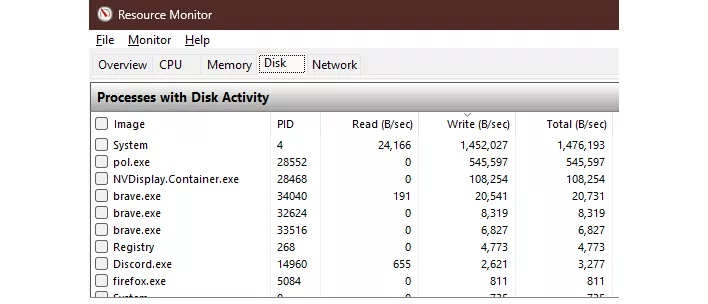
If you suspect your system is being affected, you can verify the activity using Windows Resource Monitor (Win+R, 'resmon'). Navigate to the Disk tab and sort the "Processes with disk activity" list by Writes. If NVDisplay.Container.exe appears at the top of the list with high, sustained activity, the issue is likely present on your system.
For those looking for a workaround, the most direct method is to change the startup type of the NVIDIA Display Container LS service to "Manual" and reboot. However, as previously mentioned, this may impact the availability of the NVIDIA Control Panel and G-SYNC. The only way to avoid these side effects entirely is to roll back to the previous driver version, 621.01. NVIDIA has not officially acknowledged the issue yet, but a fix is expected in a future driver update, especially given the recent scrutiny and the fact that competitors like AMD have addressed similar bugs in their subsequent releases.