

A Faster, Simpler Xbox Experience Is Coming to PC, Web and Cloud
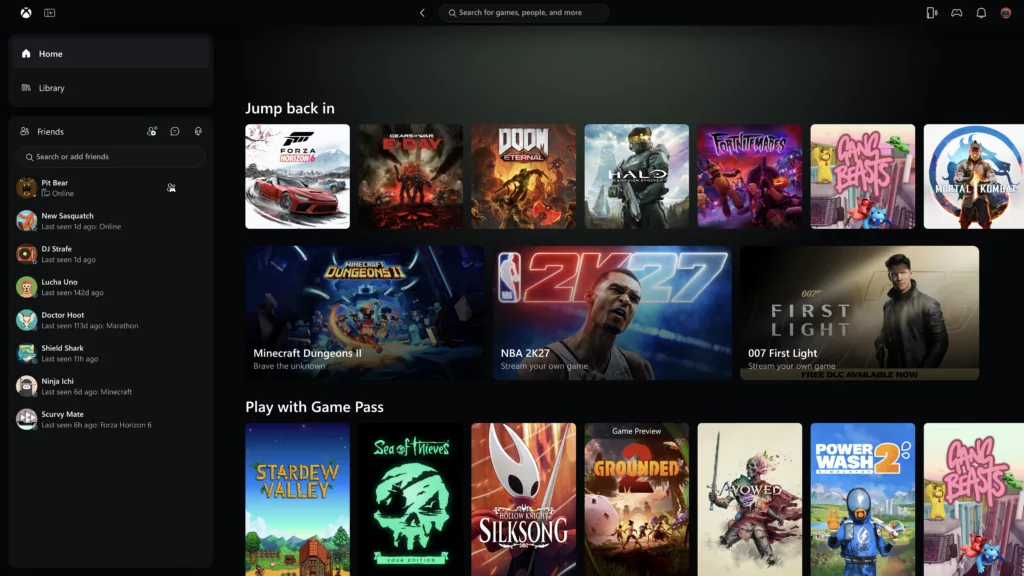
Microsoft is moving to streamline how players interact with the Xbox ecosystem across multiple platforms. Starting today, Xbox Insiders can test a revamped Xbox PC app that promises significantly faster load times, alongside a broader rollout of the refreshed Xbox web experience and updated cloud gaming interfaces for TVs and VR headsets. The initiative aims to make the service more responsive and consistent, whether you are playing on a desktop, a browser, or a large screen.
According to Jason Beaumont, VP of Xbox Experiences, the updates are designed to address user feedback regarding speed and ease of use. The core focus of this rollout is to ensure that finding games, connecting with friends, and launching sessions feels more intuitive and immediate, regardless of the hardware being used.
A faster, more responsive Xbox PC app
For those in the Xbox Insider Program, the PC application is receiving a major performance boost. Microsoft reports that the app now launches up to 60% faster than previous versions. Navigation within the app has also seen significant improvements, with the Home and Store pages loading up to 50% faster, and in-app windows opening up to 65% faster. Note that these performance metrics are based on internal testing and may vary depending on your device, internet connection, and system configuration.
Beyond raw speed, the PC app is undergoing a functional overhaul to simplify the user journey:
Expanding the web and cloud experience
The refreshed web experience, which was previously limited to Xbox Insiders, is being rolled out to more players over the coming weeks. Users can access the latest version immediately by visiting play.xbox.com. This update focuses on making cloud gaming more efficient through a browser, specifically targeting the usability of the interface on larger displays.
Key improvements to the web-based cloud gaming experience include:
Furthermore, Microsoft is beginning to bring this refreshed look and navigation to Xbox cloud gaming apps on supported TVs and VR headsets. While the interface is being adapted to suit the specific requirements of different screens—such as the unique navigation needs of a VR headset versus a TV—the goal is to maintain a familiar experience across all platforms, ensuring players can find and launch games quickly no matter where they are playing.
Флешка
