The best AMD-based ThinkPad laptop of 2026: Lenovo ThinkPad P16s Gen 5 review
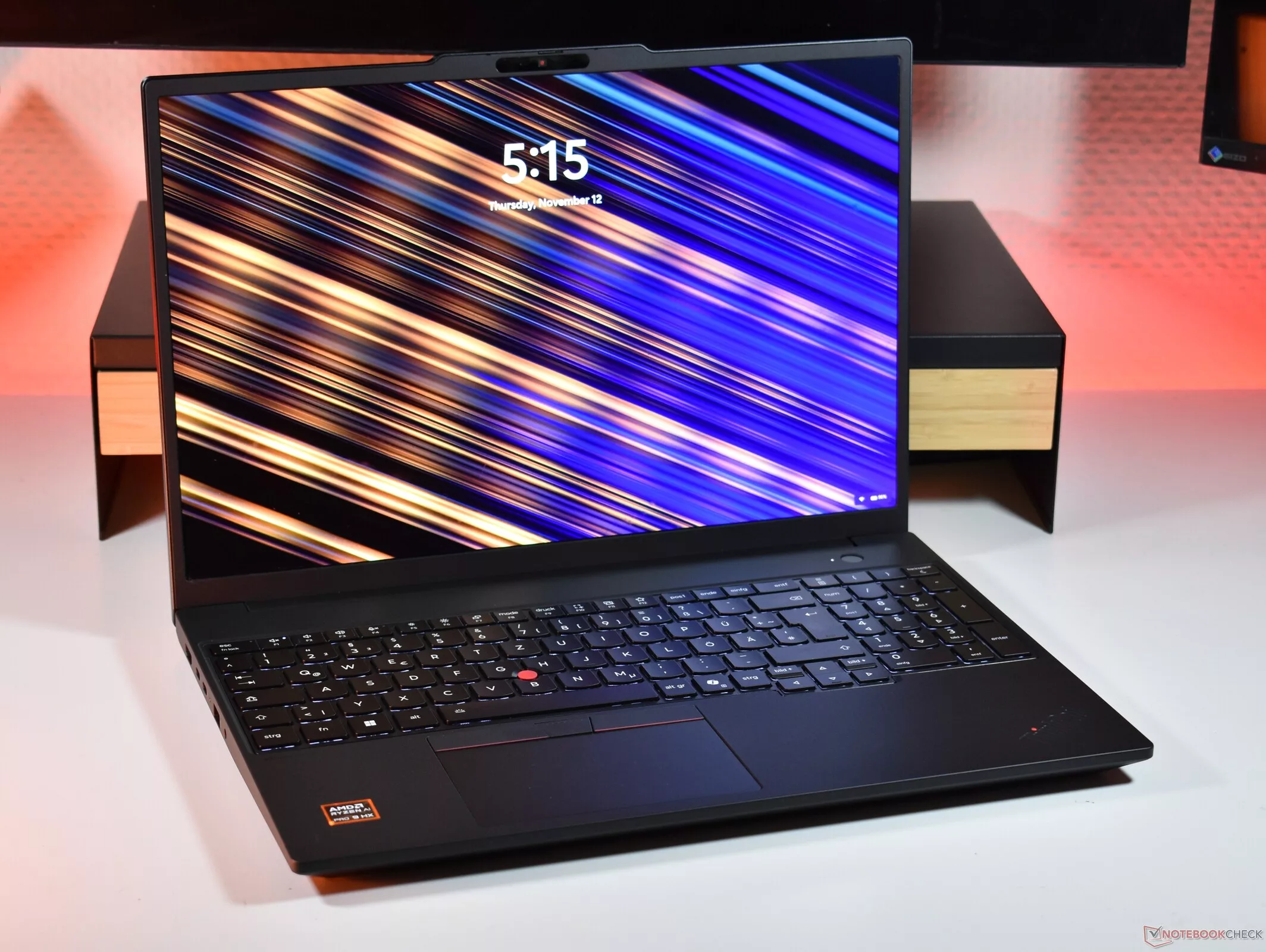
For years, the ThinkPad P16s occupied a somewhat awkward middle ground in Lenovo's workstation lineup—it was often viewed as a slightly underpowered, ultrabook-style alternative to the more robust P-series. However, the 2026 iteration, the Lenovo ThinkPad P16s Gen 5 AMD, fundamentally changes that narrative. This isn't just a minor refresh; it is a significant transformation that brings the series closer to a fully-fledged mobile workstation, making it arguably the best AMD-based ThinkPad available this year.
The P16s has historically been the entry-level gateway into the ThinkPad P series, designed for users who need CAD-capable performance without the bulk or price tag of the flagship P16. In previous generations, this meant settling for ultra-low-voltage processors that limited its professional utility. With the Gen 5, Lenovo has replaced the older P16v in the lineup and finally addressed the power deficit. The AMD variant, in particular, stands out as a standout performer, offering a level of versatility and raw power that its predecessors simply couldn't match.
A Major Hardware Leap
What makes this specific AMD model so distinctive in the current market is its configuration. It is currently the only AMD-based ThinkPad available that features an NVIDIA discrete GPU option, specifically the RTX Pro 2000 based on the Blackwell architecture. While the GPU's performance is somewhat constrained by a relatively low 55W TGP (including 20W Dynamic Boost), it provides a significant boost for professional workflows compared to integrated graphics. Additionally, this model is the only AMD ThinkPad to adopt the new LPCAMM2 memory format, supporting up to 96 GB of high-speed LPDDR5X-7500 memory in a quad-channel configuration.
Chassis and Build Quality
Moving away from the design language of the T-series, the P16s Gen 5 features a distinct, boxy, black chassis with a wide-bar hinge. While it shares a similar aesthetic to the new T-series ThinkPads, the construction materials differ. Instead of the magnesium internal frame found in the T-series, the P16s utilizes a thin aluminum sheet under the keyboard. The palmrest and bottom cover are made of ABS plastic with a smooth, rubbery coating, while the display bezel is composed of a textured plastic. While the build is solid and allows for one-handed opening, there is a slight amount of flex above the touchpad, making it feel slightly less premium than the high-end T-series.
Despite the plastic elements, the device is remarkably portable for a 16-inch workstation, weighing in at 1.96 kg—a notable improvement over the 2.2 kg of the Gen 4. It sits just above the premium ThinkPad P1 Gen 9 (1.9 kg) in terms of weight, offering a more mobile experience for professionals on the move.
Connectivity and Expansion
Lenovo has made some strategic choices regarding I/O. While it lacks the Thunderbolt 5 support found in more expensive models like the P1 or P16, it provides two Thunderbolt 4 ports. Notably, it retains a Gigabit Ethernet port, which is a step down from the 2.5G-Ethernet found in the flagship P16, but a necessary inclusion for many enterprise environments. A significant addition for this AMD model is the inclusion of a full-size SD card reader, which, while showing average transfer speeds in our testing, offers much better convenience than the previous generations.
- Two Thunderbolt 4 ports
- HDMI output
- USB-A 3.2 Gen 1 ports
- Full-size SD card reader
- RJ45 Ethernet (Gigabit)
- nanoSIM slot
- Kensington Lock slot
Connectivity and Networking
The ThinkPad P16s Gen 5 features a modern Wi-Fi 7 card, though the MediaTek MT7925 module used in our review sample is limited to 160 MHz bandwidth, preventing it from reaching the maximum theoretical transfer speeds possible under the Wi-Fi 7 standard. In our iperf3 tests, the card achieved approximately 1759 MBit/s for transmission and 2018 MBit/s for reception on a Wi-Fi 6/7 RT-BE96U router. While these results are respectable, they fall short of the performance seen in the ThinkPad P1 Gen 9, which utilizes the Intel Wi-Fi 7 BE211 and reached up to 4111 MBit/s in transmission tests.
For mobile professionals, the P16s Gen 5 offers an optional 5G/LTE module. Although our specific review unit did not include this module, the chassis is prepared for it, featuring the necessary antennas, an empty M.2 slot, and a nanoSIM slot for easy upgrades.
Display Options and OLED Performance
The P16s Gen 5 offers three 16-inch 16:10 matte screen options. Notably, unlike the higher-end P series, this model does not offer a 4K-WQUXGA resolution. The options include a standard WUXGA IPS panel (400 cd/m², 45% NTSC), a WUXGA IPS panel with 500 cd/m², 100% sRGB, and In-Cell Multitouch, and a premium 2.8K OLED panel (2880 x 1800) with 500 cd/m², 100% DCI-P3, and 30-120 Hz VRR.
Our review unit was equipped with the high-end 2.8K OLED display. It delivers an impressive 500 cd/m² of brightness and features extremely fast response times (1.27 ms for grey-to-grey). While it uses PWM (Pulse Width Modulation) for brightness regulation, the frequency is high (over 1000 Hz), making it unlikely to cause issues for most users. Color accuracy is excellent, with a calibrated Delta E of 4.9 and 95.9% sRGB coverage, though it covers 88.5% of the DCI-P3 gamut.
Maintenance and Modular Design
One of the standout features of the P16s Gen 5 is its high degree of serviceability. The bottom cover is held by seven screws and clips, providing easy access to several modular components. This includes the M.2 2280 SSD and the LPCAMM2 memory—the latter making this the only AMD-based ThinkPad to support the LPCAMM2 standard. Additionally, there is an extra M.2 2242 slot for 5G expansion.
Lenovo has also addressed user-serviceability in this generation. The USB-C charging ports are now modular and replaceable, and the keyboard can be replaced by the user, a significant improvement over the previous P16s chassis. The battery is also designated as a Customer Replaceable Unit (CRU).
Input Devices and Security
The keyboard is a standard full-size backlit Chiclet design with 1.5 mm travel and a dedicated numpad. It offers a comfortable typing experience suitable for long-term daily use. The input suite is completed by a mechanical plastic clickpad (11.5 x 6.5 cm) and the iconic red TrackPoint with three dedicated buttons, which remains highly effective for precision tasks in cramped environments.
Security remains a priority for this business-oriented machine. It includes a fingerprint sensor, an IR webcam, a mechanical webcam privacy shutter, and a Kensington lock slot. Additionally, it offers an optional Smartcard reader, a feature typically reserved for more expensive models like the ThinkPad P1.
Display: High Brightness but Color Inaccuracy
The display panel presents a significant contradiction. While it offers a respectable 500 cd/m² of brightness and a matte surface—making it viable for outdoor use, though direct sunlight remains a challenge—the color reproduction is disappointing. Despite Lenovo's promises, the panel fails to fully cover the sRGB color gamut, which can lead to noticeable issues during color-sensitive work.
On the positive side, the screen's response times are excellent. With measured black-to-white response rates of 1.5 ms (0.78 ms rise / 0.72 ms fall) and grey-to-grey rates of 1.27 ms, the display is well-suited for fast-paced content. Regarding eye comfort, the PWM (Pulse-Width Modulation) frequency is measured at 1224.6 Hz. While this is high enough that most users sensitive to flickering shouldn't notice it, it is still a form of modulation used for dimming.
Hardware Configuration and Thermal Management
The ThinkPad P16s Gen 5 AMD is offered with three CPU options: Ryzen AI 5 Pro 440, Ryzen AI 7 Pro 450, and the high-end Ryzen AI 9 Pro HX 470. Graphics are handled by three Nvidia dGPU models based on the Blackwell architecture: RTX Pro 500, RTX Pro 1000, and RTX Pro 2000. Users can also opt for a configuration without a dedicated GPU, though this relies on the AMD iGPU and utilizes a single-fan cooling solution.
Memory and storage options include up to 96 GB of LPDDR5X-7500 via a single upgradeable LPCAMM2 module. For storage, there is one M.2 2280 slot, limiting the maximum SSD capacity to 2 TB.
CPU Performance: A Significant Leap for the Series
The tested Ryzen AI 9 Pro HX 470 (Gorgon Point architecture) features 12 cores (4x Zen5 up to 5.2 GHz and 8x Zen5c up to 3.3 GHz) and 24 threads. Compared to the previous Gen 4 model, the Gen 5 shows a roughly 15 percent increase in CPU performance. This leap is attributed to a more robust cooling system and higher power limits; while the Gen 4 was restricted to a PL1 of 36 W, the Gen 5 can reach 54 W in 'Best Performance' mode.
In Cinebench R23 Multicore, the device achieved 22,921 points. However, users should note that performance drops by approximately 39 percent when running on battery (16,509 points in Cinebench R23). While the P16s Gen 5 AMD slightly outperforms the Intel-based ThinkPad P1 Gen 9 in raw CPU tasks, it trails behind in overall system responsiveness and PCMark 10 benchmarks.
A Massive Leap in Graphics Performance
For the first time in the ThinkPad P16s lineup, Lenovo has introduced a dedicated GPU: the NVIDIA RTX Pro 2000 Blackwell. This is a significant departure from previous iterations; while Intel-based models were limited to the RTX Pro 1000 Blackwell, and older AMD versions relied solely on integrated graphics, the Gen 5 AMD version offers a substantial upgrade. Compared to the previous ThinkPad P16s Gen 4 AMD, which used integrated Radeon 890M graphics, this model delivers approximately 59% more GPU performance.
However, this power comes with caveats. The RTX Pro 2000 is subject to strict power limits, operating at a TGP of 55W, which drops to 35W when the CPU is under load. This thermal management means the laptop cannot match the performance of its more expensive siblings; the ThinkPad P1 Gen 9 is roughly 19% faster in SPECviewperf benchmarks, and the ThinkPad P16v Gen 3 is about 8% faster, despite using the same GPU class.
Gaming and Professional Workloads
While not a primary gaming machine, the P16s Gen 5 AMD is capable of playing modern titles. It performs well at Full-HD (1920 x 1080) resolution, though frame rates drop noticeably in QHD (2560 x 1440) even when DLSS is enabled. In professional rendering tasks like Blender (v3.3 Classroom CUDA), the system takes 49 seconds, which is slightly slower than the HP ZBook X G1i 16 (45s) and the ThinkPad P1 Gen 9 (41s), but significantly faster than the CPU-only rendering times of older models.
Storage and Memory Performance
The laptop's storage configuration shows a mismatch between hardware potential and system implementation. While it ships with a high-speed 2 TB Samsung PM9E1 PCIe 5.0 SSD, the system is limited to PCIe 4.0 speeds. Despite this bottleneck, the drive maintains impressive sustained performance without thermal throttling. In terms of raw speed, the Samsung PM9E1 performs well in benchmarks, outperforming the Micron 3500 found in the previous Gen 4 model.
System Latency and Memory
In terms of system responsiveness, the P16s Gen 5 AMD shows higher DPC latency (7504.1 μs) compared to its predecessor (646.5 μs) and other workstations like the HP ZBook X G1i 16 (620.8 μs). This increased latency is a notable trade-off in this configuration. On the memory side, the system achieves a memory read speed of 80,650 MB/s, which is slightly below the average for the AMD Ryzen AI 9 HX PRO 470 class (77,703 MB/s) but shows a significant improvement over the Gen 4's 72,875 MB/s.
A Quieter, Cooler Workstation
In terms of acoustics, the Lenovo ThinkPad P16s Gen 5 AMD manages to stay quiet during idle tasks or light web browsing, particularly when operating in lower power modes. Under heavy load, the dual-fan system reaches a maximum noise level of 46.9 dB(a). While this is considered loud, it remains within a tolerable range and is notably quieter than most other mobile workstation laptops in its class. Additionally, no coil whine was detected during testing.
Thermal Management and Power Delivery
Despite the inclusion of an NVIDIA GPU, the P16s Gen 5 AMD runs cooler than its predecessor, the Gen 4 AMD, which is likely due to the addition of a second fan. During combined CPU and GPU stress tests, the system reached a maximum temperature of 46.8 °C. While this is considered hot, the heat is concentrated in specific areas: a single hot-spot above the keyboard and the middle of the bottom cover. The rest of the chassis remains manageable, with the palmrest and touchpad staying below skin temperature at a maximum of 28 °C.
The thermal solution handles a combined load of approximately 80 W (45 W for the CPU and 35 W for the GPU) without any detected thermal throttling. Regarding power efficiency, the addition of an OLED screen and an NVIDIA GPU does not significantly increase power consumption compared to the older model without these features, though idle consumption rises from 3.9 W to 5.5 W. Peak power consumption reached 141.8 W, which slightly exceeds the 140 W USB-C charger's capacity; however, because power spikes are transient, there is no risk of the battery discharging during use.
Audio Performance
The audio setup consists of two bottom-firing speakers. While their total volume is somewhat limited, they are well-balanced and provide more bass than the comparable HP ZBook X. The speakers achieve an average loudness of 79.6 dB. While the bass is slightly lower than the median (by about 10.6%), the mids and highs are well-balanced and linear, making the overall sound profile quite consistent.
Power Consumption and Efficiency
The Lenovo ThinkPad P16s Gen 5 (21XG002EGE) demonstrates a sophisticated approach to power management, particularly when compared to its competitors in the workstation class. In idle scenarios, the device is remarkably efficient, consuming an average of 12.3 W, which is 78% less than the average of its class. Even under heavy stress tests like Prime95 and FurMark, the power draw remains controlled, averaging around 130.3 W.
When running demanding applications like Cyberpunk 2077 at FHD ultra settings (without FSR), the laptop draws an average of 103.4 W. When an external monitor is connected, this load increases slightly to 101.7 W. While the device manages heat effectively, maintaining a high level of performance, the power consumption profile is typical for a mobile workstation equipped with a dedicated NVIDIA GPU.
Battery Life and Portability
Despite an increase in battery capacity from 86 Wh in the previous generation to 90 Wh in the Gen 5, the combination of an OLED display and the NVIDIA GPU places a significant strain on the battery. In our Wi-Fi/websurfing test, the device lasted 11 hours and 38 minutes, which is a respectable score but not exceptional for a device of this class. Under heavy load, the runtime drops significantly to just 2 hours and 11 minutes.
Users looking for maximum endurance might find better results with the IPS screen variant, as the OLED panel's power requirements are a major factor in the current battery performance.
Verdict and Comparison
The ThinkPad P16s Gen 5 stands out as a highly capable AMD-based workstation. It excels in connectivity and weight management, offering a premium build that remains relatively portable at 2 kg. While its gaming performance is adequate for a workstation, its primary strength lies in its professional application performance and efficient idle power states.
- Pros: Excellent connectivity, lightweight for its class (2 kg), high repairability (92%), and superior idle efficiency.
- Cons: Limited battery life under load, OLED panel impacts endurance, and average camera quality (55%).