

NVIDIA App overlay adds CPU temperature and power metrics
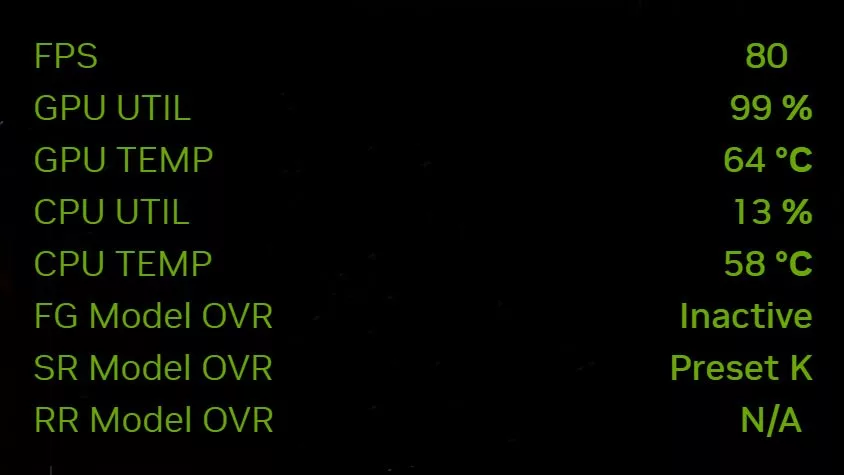
NVIDIA has quietly expanded the monitoring capabilities of its NVIDIA App, adding CPU metrics to its performance overlay without a major fanfare in the official release notes.
Following recent updates to the NVIDIA App, users have discovered that the application's built-in overlay now supports displaying real-time data for the central processor. This new feature allows gamers and enthusiasts to view CPU temperature, clock speed, and power consumption directly within the overlay interface.
The implementation of these metrics is accessible via the custom Statistics view in the overlay. Users can toggle the display of CPU temperature alongside existing GPU metrics, frame rates (FPS), and DLSS information. The clock speed and power consumption readings are also available for simultaneous monitoring.
However, the granularity of the new data is limited compared to dedicated third-party tools. Currently, the overlay presents a single aggregate reading for CPU temperature rather than providing detailed per-core thermal data. Similarly, while the feature adds significant value by consolidating information, it does not yet expose system RAM or VRAM usage.
Community feedback highlights several missing features that users have requested but are not currently available in this update. These include per-core CPU utilization graphs and a frame-time graph to help identify stuttering. The absence of these specific metrics means the overlay still cannot fully replace specialized monitoring software like MSI Afterburner, RTSS, or HWiNFO.
An interesting observation from the release notes is that NVIDIA did not explicitly list these CPU monitoring changes in the documentation for version 11.0.9. The official changelog focused on other updates, such as DLSS 4.5 Ray Reconstruction, per-application Resizable BAR controls, and various interface adjustments. This omission likely explains why the new CPU overlay options went largely unnoticed by many users until they were spotted in practice.
This update represents a step toward better system visibility without requiring additional software overhead, though it remains a partial solution for those seeking comprehensive hardware telemetry within the NVIDIA ecosystem.
Гика
