
Modder brings DLSS 5 neural rendering to Windows desktop
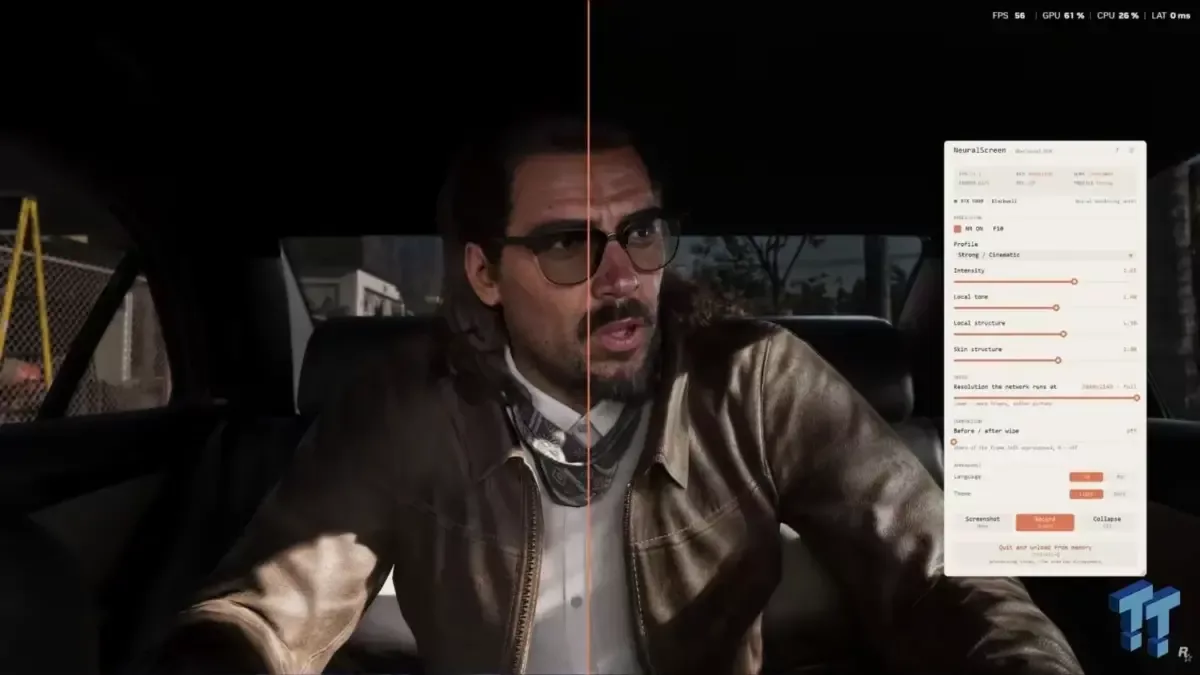
A new modding tool called NeuralScreen has emerged, allowing users to apply NVIDIA's DLSS 5 neural rendering technology to the entire Windows desktop environment without requiring native support from individual applications. Developed by WhyCry and available on GitHub, this utility bypasses the need for game engine integration by capturing the screen output, processing it through NVIDIA's Neural Rendering library, and displaying the result via a fullscreen overlay. This approach enables super-resolution and frame generation effects across browsers, video players, photo viewers, and games running in windowed or borderless modes, effectively bringing high-end AI rendering capabilities to general productivity tasks.
How NeuralScreen Works
The core of the tool is a modified version of the nvngx_dlssnr.dll library, which is typically used by games natively supporting DLSS 5. Unlike traditional upscaling methods that rely on specific API calls within an application, NeuralScreen operates at the system level. It intercepts the rendered frames from any windowed or borderless application and processes them before they are displayed to the user. The software includes a split-screen slider feature that allows users to toggle between the original unprocessed image and the AI-enhanced version for direct comparison.
Supported Profiles and Limitations
Users can switch between four distinct rendering profiles: Faithful, Natural, Strong/Cinematic, and Extreme/Overdrive. These settings adjust the balance between image fidelity, sharpness, and processing speed. However, significant limitations exist regarding application compatibility. The overlay mechanism cannot cover true fullscreen applications; therefore, games or media players must be launched in windowed or borderless mode to function correctly with NeuralScreen.
Performance Impact at 4K
Benchmarks conducted by the developer using a GeForce RTX 5070 Ti and driver version 616.56 reveal the performance cost of this technology. Processing a full 4K desktop environment reportedly consumed enough GPU resources to drop system performance to approximately 42.9 FPS. Reducing the internal processing resolution to 2560×1440 increased performance to 65.3 FPS, representing roughly a 52% improvement in frame rate. The developer noted that while this lower resolution setting is faster, the resulting image appears softer because the processed output must be scaled back up to the native desktop resolution.
Hardware Compatibility and Workarounds
NVIDIA's official DLSS 5 library includes kernels for Turing, Ampere, Ada, and Blackwell architectures. However, NVIDIA has implemented an architecture check that blocks GPUs older than the Blackwell generation from accessing these libraries. NeuralScreen attempts to bypass this restriction by including a workaround specifically for older RTX GPUs. While the tool is confirmed to work with GeForce RTX 50-series cards via the standard path, testing on a GeForce RTX 30-series laptop resulted in incorrect behavior, where the overlay launched but displayed a very dim or almost completely black image. This suggests that while the workaround exists, it may not be universally stable across all older architectures.
Security and Anti-Cheat Warnings
The developer explicitly warns users against running NeuralScreen with competitive online games. The presence of the nvngx.dll process and the fullscreen overlay can trigger anti-cheat software, potentially leading to bans or instability in titles that are sensitive to external processes. Users are advised to exercise extra caution when applying this mod, especially given the growing number of DLSS 5-related tools appearing on the market. The tool is intended for productivity and media consumption rather than competitive gaming environments.
Гика
