
How to Mod NVIDIA DLSS 5 Neural Rendering Into Unsupported Games
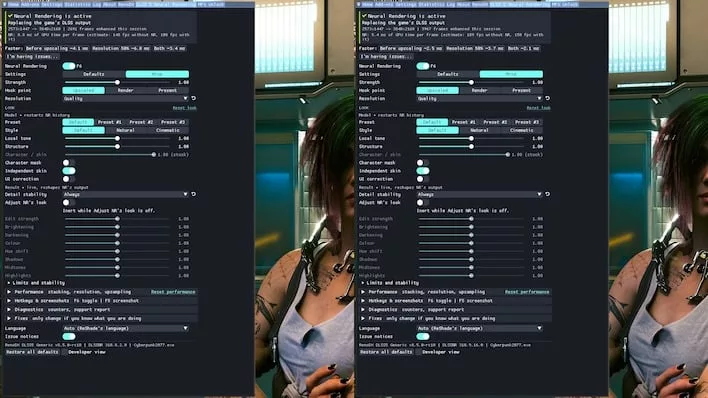
The DLSS 5 Neural Rendering technology, announced by NVIDIA alongside the RTX Spark platform, has found an unexpected use case in the modding community. Even without official game support, enthusiasts are replacing legacy libraries with the new version, achieving significant performance gains with minimal impact on image quality.
Real-world performance of Neural Rendering
Reports shared on X demonstrate a substantial performance jump. Specifically, comparisons from Detro using a GeForce RTX 4080 SUPER show that the new DLSS 5 version reduces upscaling time from 8.8ms to 5.4ms. This results in a frame rate increase from 108 FPS to 150 FPS. It is important to note that these figures include 4x multi-frame generation, which corresponds to base frame rates of 27 and 37.5 FPS; even so, the 39% uplift remains massive for a DLL swap.
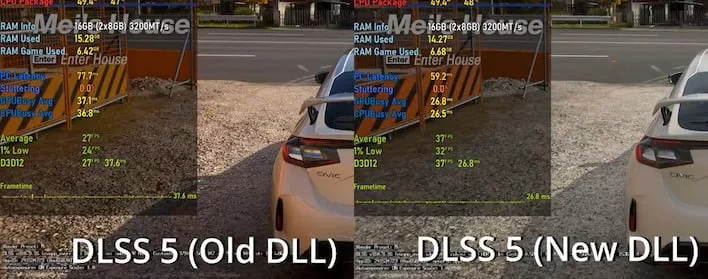
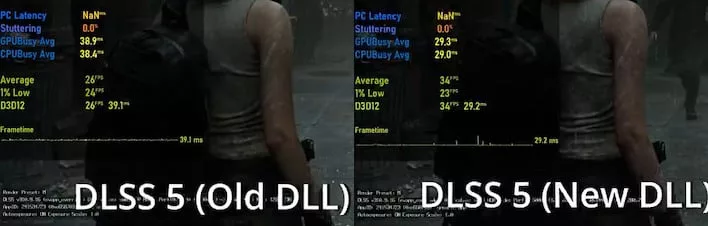
Impressive results are also seen on mid-range hardware. In Forza Horizon 6, a GeForce RTX 4060 saw a jump from 27 to 37 FPS. While Resident Evil 9 shows a more noticeable difference in image quality between the old and new models, the change is considered minor considering the speed increase.
Visual nuances and installation method
The visual impact of Neural Rendering varies by title. In Cyberpunk 2077, the effect on character faces may appear distinct, whereas in less stylized games like NBA 2K27, the technology provides a significant visual boost alongside the performance gain.
The installation process is not straightforward and requires third-party tools. To use the mod, you will need to:
- Download ReShade (the Addons version, making it unsuitable for online games);
- Join the "RenoDX" Discord to obtain the modified version that allows DLSS 5 injection;
- Place the new DLL version in the same directory as the game executable.
Once installed, effects can be customized using the Home key. A more detailed guide is available via the RenoDX Discord.
Гика
