
Asus ExpertBook A7 Review: Premium Chassis, Mediocre Performance
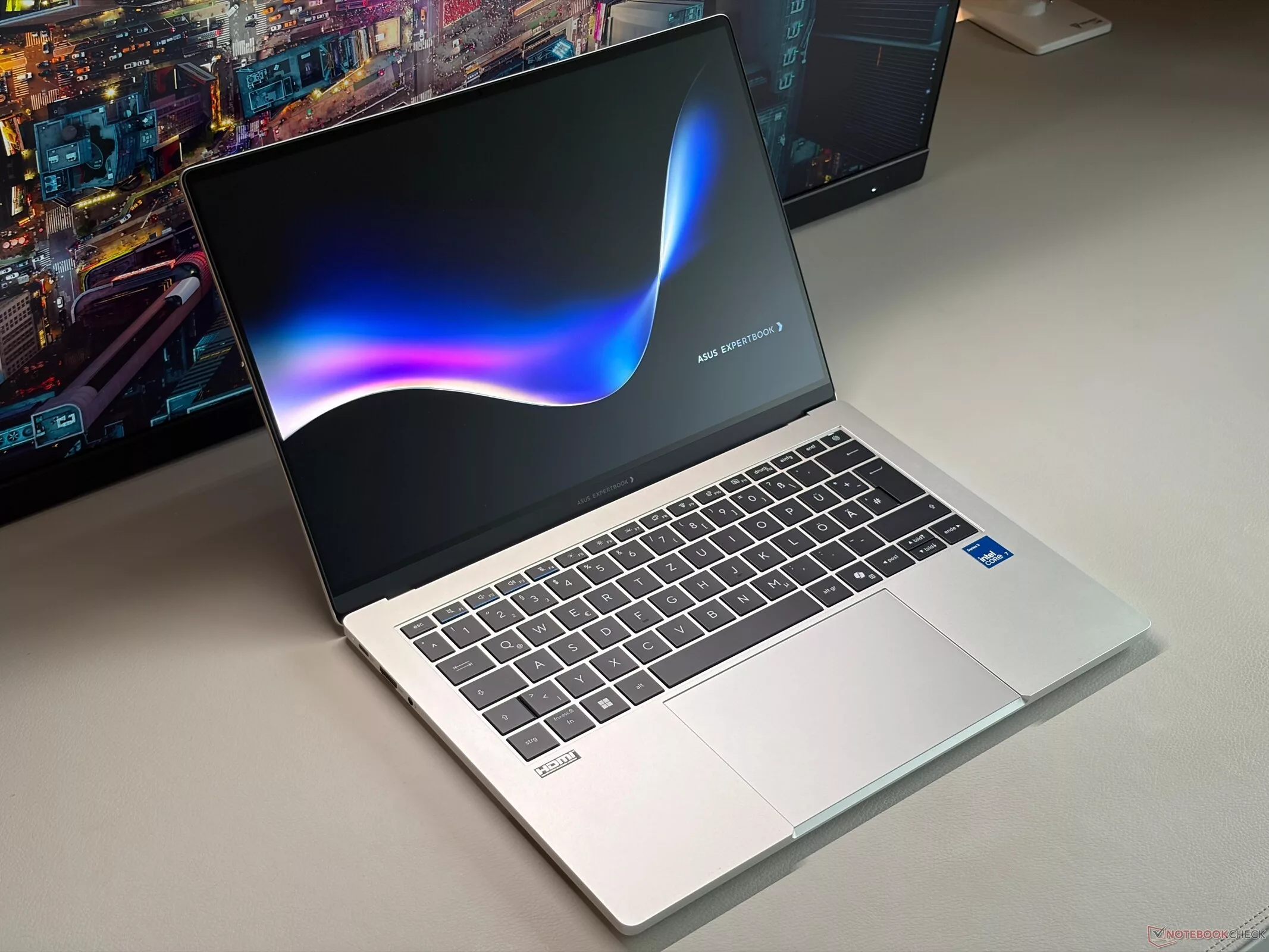
At first glance, the new Asus ExpertBook A7 looks like a premium business machine designed to compete with the MacBook aesthetic. It boasts a high-quality aluminum unibody chassis and a smooth 120 Hz OLED panel. However, beneath this polished exterior lies a disappointing reality: a slow Intel Wildcat Lake processor, a shallow keyboard, and a display that suffers from significant graininess, making the premium price tag hard to swallow.
The standout feature of the Asus ExpertBook A7 is undoubtedly its build quality. The slim, metal unibody chassis—available in silver or black—feels exceptionally premium and stable. The silver variant is particularly resistant to fingerprints, and the hinges are well-tuned, allowing the screen to open up to 135 degrees. While the design is top-tier, the internal maintenance options are somewhat restricted, limited primarily to the SSD, fans, and the battery.
Display: A Grainy OLED Experience
While Asus has equipped the device with a matte 120 Hz OLED panel, the actual viewing experience is marred by significant issues. The entire image appears extremely grainy, to the point where the subpixel array is barely visible in tests. This graininess significantly degrades the subjective image quality, making it difficult to fully appreciate the inherent benefits of OLED technology, such as deep blacks and fast response times. Furthermore, while the SDR brightness reaches a respectable ~500 nits, the HDR peak brightness is limited to just 550 nits, which fails to provide a meaningful HDR effect. We also detected PWM flickering, though the frequency is relatively high at 960 Hz.
On the positive side, the color accuracy is excellent out of the box for the DCI-P3 color space. However, unlike many other Asus devices, the ExpertBook A7 lacks an sRGB color profile, which may be a drawback for users working in that specific standard.
Performance and Connectivity
The performance side of the ExpertBook A7 is where the device struggles to justify its cost. It is powered by an Intel Core 7 350 based on the Wildcat Lake architecture. While it handles basic tasks, the CPU and the integrated Intel Graphics 2 Xe3 iGPU are relatively slow for a machine in this price bracket. This mediocre performance is paired with a keyboard that feels underwhelming; despite being backlit and precise, the key travel is limited to just 1.0 mm, resulting in a shallow typing experience that is noticeably worse than the ExpertBook Ultra or most other Asus laptops.
Connectivity options also feel dated for a 2026 premium business laptop. While it includes USB-C and USB-A ports, there is no support for USB 4.0 or Thunderbolt 4, and the device is limited to Wi-Fi 6E rather than the newer Wi-Fi 7 standard. The 1080p webcam is functional but produces mediocre results.
A High-End OLED Display
The standout feature of the Asus ExpertBook A7 is undoubtedly its 14-inch OLED panel. With a resolution of 2880x1800 and a 120 Hz refresh rate, it offers a visual experience that significantly outclasses the IPS competitors in this class. The display reaches a peak brightness of 502 cd/m², with an average brightness of 496.4 cd/m², ensuring excellent visibility even in well-lit environments. Color accuracy is impressive, covering 99.9% of the sRGB gamut and 98.7% of Display P3, making it a viable tool for creative tasks.
Beyond color, the OLED technology provides exceptional contrast ratios (49400:1) and near-perfect black levels (0.01 cd/m²). Response times are also elite; the screen's ability to transition from black to white is measured at just 0.5 ms, making it highly suitable for fast-paced content. For users sensitive to screen flickering, the PWM frequency is quite high at 960 Hz, and flickering is only detected at brightness levels below 90%, which should be imperceptible to most.
Performance: Strong Single-Core, Weak Multi-Core
Under the hood, the ExpertBook A7 relies on the Intel Wildcat Lake Core 7 350, a 6-core processor. While single-core performance is respectable and sufficient for snappy office work, the multi-core performance is notably underwhelming. In Cinebench R15, the chip averaged 1015 points, trailing significantly behind the AMD Ryzen AI 7 450 found in the HP EliteBook 8 G2a. This limitation becomes even more apparent during heavy multitasking or when running on battery, where multi-core performance drops by approximately 35%.
Graphics performance is also a mixed bag. While the system feels responsive due to the fast SSD, the integrated Intel Graphics 2 Xe3 WCL shows a massive gap in benchmarks compared to its AMD-based rivals. In AIDA64 memory copy tests, the bandwidth is significantly lower than the class average, which, combined with the low memory bandwidth, can create bottlenecks in demanding applications.
Memory and Storage Considerations
The system's responsiveness is bolstered by a fast SSD, but potential buyers should exercise caution regarding the RAM. The base models in certain regions are equipped with only 8 GB or 12 GB of RAM. Given the low memory bandwidth and the processor's architecture, these configurations may struggle with modern, memory-intensive applications, making them a suboptimal choice for professional workflows.
Graphics and Gaming: The Weakest Link
The standout drawback of the ExpertBook A7 is its integrated graphics. Equipped with the Intel Graphics 2 Xe3 Wildcat Lake iGPU, this configuration features only two Xe3 cores. This makes it arguably the slowest iGPU currently available in this segment. While it is perfectly capable of handling standard productivity tasks and 4K video playback, it is largely unsuitable for gaming. In 3DMark 11, the device scored 4,089 points, trailing significantly behind the office class average of 8,465 points and falling far behind competitors like the HP EliteBook 8 G2a 14 (Radeon 860M) which scored 11,677 points.
Real-world gaming performance confirms these limitations. In benchmarks for popular titles, the ExpertBook A7 struggled to keep pace. In Cyberpunk 2077, it achieved a performance rating of only 19.9, compared to 96.4 for the HP EliteBook 8 G2a 14. Even in less demanding titles like Dota 2 Reborn, it scored 59, while the HP model reached 106.4. For users looking for a machine that can handle anything beyond basic office work, the graphical capabilities here are a major bottleneck.
Storage and Memory Performance
The device is equipped with a SanDisk PC SN5100S SSD. In terms of raw sequential speeds, it delivers up to 6,360 MB/s for reads and 4,919 MB/s for writes. However, the 4K random access performance is more modest, with reads at 42.7 MB/s and writes at 60.3 MB/s. In the DiskSpd performance rating, the drive earned 77.4 points, placing it slightly below the office class average of 79.5 points and behind the Western Digital PC SN7100S found in the Lenovo ThinkPad E14 G8 (84.4 points). Interestingly, the device shows no signs of significant disk throttling during sustained read loops, maintaining consistent speeds compared to some competitors.
Thermal Management and Noise Profile
On the positive side, the ExpertBook A7 is exceptionally cool. Even under heavy load, the SoC temperatures remained very manageable, peaking at 38.3 °C, while the average stayed around 32.6 °C. The palmrest and touchpad areas remained cool to the touch, with maximum temperatures of 28.1 °C, which is well below skin temperature. This thermal efficiency is a notable advantage, as the device stays significantly cooler than the average for its class.
However, the acoustic experience is a mixed bag. While the laptop is generally quiet, the fan behavior is somewhat suboptimal. The fans tend to ramp up quickly and produce a slightly high-pitched sound that can be perceived as more annoying than the decibel readings suggest. In Performance mode, noise levels can reach up to 38 dB(A), which is audible and noticeable during intensive tasks.
Audio Quality
The audio analysis shows a profile that is functional for office environments but lacks depth. The frequency response indicates a focus on the mid-range, with a noticeable dip in the deep bass region, which is typical for thin-and-light business laptops. While sufficient for video calls and casual media consumption, it does not aim for high-fidelity playback.
Audio Performance: A Surprising Contender
While the Asus ExpertBook A7's design draws comparisons to a business-oriented MacBook, its audio performance tells a more nuanced story. In our testing, the speakers proved to be relatively loud, reaching 84.9 dB. The frequency response is notably linear across the spectrum, with mids and highs staying within a tight 3-5% delta from the median. However, there is a slight compromise in the low end: the bass is reduced, averaging about 10% lower than the median, which is typical for a chassis of this thinness.
When placed in context against its direct competitors, the ExpertBook A7 holds its own. In its specific class, only 6% of tested devices performed better, while 92% were worse. Interestingly, when compared to all devices tested across all categories, it sits in the top 11%. This places it ahead of many mainstream laptops, though it still trails behind the specialized audio tuning found in some high-end workstations.
Comparative Audio Analysis
- Apple MacBook Air 13 M5: Offers highly balanced mids and highs, though it also suffers from reduced bass (10.5% below median). It ranks in the top 9% of all tested devices.
- HP EliteBook 8 G2a 14: A standout in this comparison, featuring exceptionally balanced mids and highs (within 2-3% of median) and high loudness (87.4 dB). It is significantly better than 98% of its class.
- Lenovo ThinkBook 14x (Ultra 5 226V): Shows a significant deficit in bass (17.2% below median) and higher mids, but remains competitive in high-frequency balance.
- Lenovo ThinkPad E14 G8: Struggles with bass (18.8% below median) and shows higher mids, though it remains a solid performer compared to the general market average.
Power Consumption and Battery Life
The ExpertBook A7 demonstrates impressive power efficiency. The included 65W PSU is more than sufficient for its low-power profile. Under load, the system draws an average of 28.2W, which is significantly lower than many competitors like the Lenovo ThinkBook 14x (48.1W) or the MacBook Air M5 (42.9W). Even in idle states, its power draw remains remarkably low, averaging around 4.73W.
In terms of real-world endurance, the ExpertBook A7 delivers an average of 15 hours and 49 minutes during WiFi web surfing tests. This performance is slightly below the class average of 13.8 hours when considering the specific test conditions, but it remains a very respectable figure for a professional machine. Under maximum brightness, the runtime drops to approximately 8 hours and 55 minutes.
Battery Life Comparison (WiFi Web Surfing)
- HP EliteBook 8 G2a 14: 19.3 hours (The leader in this group)
- Lenovo ThinkBook 14x: 16.9 hours
- Apple MacBook Air 13 M5: 16.2 hours
- Asus ExpertBook A7: 15.8 hours
- Lenovo ThinkPad E14 G8: 13.3 hours
The Asus ExpertBook A7 makes a striking first impression, primarily due to its construction. Moving away from the more utilitarian plastic finishes often found in mid-range business machines, the A7 utilizes a full metal chassis that provides a premium, rigid feel. This design choice gives the laptop a silhouette and tactile quality that many users will find familiar, drawing immediate comparisons to the MacBook aesthetic. However, while the exterior suggests a high-end workstation, the internal reality is more nuanced.
Build Quality and Aesthetics
The metal chassis is the standout feature of the ExpertBook A7. It is not just about looks; the structural integrity is evident in the lack of keyboard flex and the overall sturdiness of the unit. For professionals who prioritize a device that feels substantial and durable during travel, this is a significant step up. The finish is clean, avoiding the fingerprint magnet issues common in some glossy alternatives, though it does prioritize style in a way that might feel more 'consumer-premium' than 'corporate-rugged'.
Performance and Thermal Constraints
Despite the premium shell, the actual performance delivered by the ExpertBook A7 is somewhat limited. The device struggles to fully leverage its internal components under sustained workloads. This appears to be a direct consequence of the thermal management strategy. While the chassis is elegant, the cooling solution seems unable to prevent thermal throttling during intensive tasks, meaning the laptop cannot maintain its peak clock speeds for extended periods. For users performing heavy data processing or multitasking with demanding applications, this performance ceiling is a critical consideration.
In summary, the ExpertBook A7 is a device of contrasts. It offers a high-end, MacBook-like build quality that elevates it above many of its contemporaries in the business segment. However, the trade-off for this sleek design is a performance profile that may fall short for power users who require consistent, unthrottled hardware output. It is a machine that excels in presentation and portability but faces challenges when pushed to its limits.
Гика
