
AMD Radeon Software Bug Can Hammer SSDs Even When Your PC Is Idle
A bug within AMD's Radeon Software is reportedly causing continuous, unnecessary write operations to system drives, even when the PC is idle. This issue, which primarily affects users with AMD chipsets, could lead to premature wear on NAND flash storage by consuming valuable program/erase (P/E) cycles.
While enthusiasts raised concerns about unnecessary disk writes in AMD drivers about a year ago, most analysts concluded the impact was negligible due to the event-driven nature of the writes. However, a new issue has emerged that is significantly more aggressive. Unlike previous instances, this bug appears to trigger continuous disk activity, which poses a legitimate risk to the longevity of SSDs, particularly for those running systems 24/7 or using smaller capacity drives with limited endurance.
The Cause: A Loop in the External Events Utility
The culprit has been identified as the AMD External Events Utility (running as the background process atieclxx.exe). According to observations from users on Reddit, the utility is stuck in a loop searching for obsolete chipset driver components that were removed after version 26.3.1. This issue specifically affects motherboards using AMD chipsets, including all Socket AM4 and AM5 platforms, as the utility continues to scan for these missing components during operation.
If left unaddressed, this background chatter can translate into dozens of gigabytes of unnecessary host writes to the system disk every single day. For users with high-performance or high-capacity NAND flash, this constant activity accelerates the depletion of P/E cycles, which are finite for all SSDs.
How to Verify if Your SSD is Being Impacted
Not every Radeon-based system is currently exhibiting this behavior, so users should verify their status using the following steps:
- Press Win + R, type resmon, and hit Enter to open the Windows Resource Monitor.
- Go to the Disk tab.
- Expand 'Processes with Disk Activity' and sort by write speed, looking for continuous activity from atieclxx.exe.
Temporary Workarounds and Official Fix
While waiting for an official patch, users on Reddit have suggested a manual workaround: extracting three specific files (amdkmpfd.ctz, .itz, and .stz) from the 26.3.1 driver package and placing them into 'C:\Windows\System32\AMD\amdkmpfd\'. Note that this method has not been independently verified and results may vary.
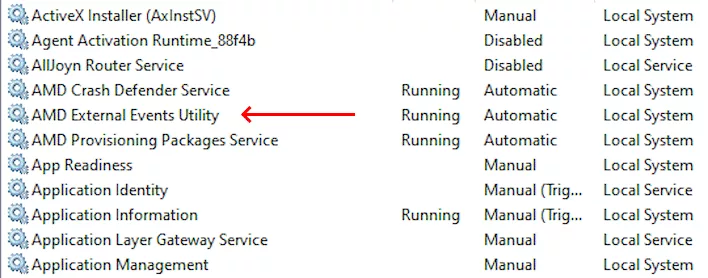
A simpler, though potentially disruptive, workaround is to disable the service entirely. By opening 'services.msc', locating 'AMD External Events Utility', and setting its startup type to 'Disabled', the disk activity should cease after a reboot. However, users should be aware that disabling this utility may break FreeSync functionality on certain hardware configurations.
AMD has officially acknowledged the issue. A company representative, 'AMD_Vik', confirmed on Reddit that the team has identified the interaction causing the loop. An official fix is expected to be included in the upcoming Adrenalin 26.11.1 driver update, which is slated for release later this month.
Гика
