
Open-source USB tool unlocks Nvidia's half-speed GPU AI limiter on Windows — lifts FP16 math performance up to 65%
A new open-source project, nv-uefi-unlocker, has arrived to bypass Nvidia's built-in AI performance limiter on Windows. By running from a bootable USB drive before the OS loads, the tool allows RTX 20, 30, and 40-series desktop and laptop GPUs to access full FP16 math performance, with some tests showing up to a 65% increase.
For a long time, the 'half-speed' AI performance cap on consumer Nvidia GPUs has been a point of contention. The nv-uefi-unlocker project uses the community V67 payload with read-back verification to trick Nvidia's signed Booter firmware. This process opens the write lock on two specific speed-selector registers, allowing tensor units to operate at their full rated speed. In one demonstration on a laptop RTX 4060, the developer reported a 65% boost in FP16 (half-precision) math performance.
How the unlocker works
Unlike previous methods that required manual installation of Linux modules, this tool is designed for ease of use on both Windows and Linux. The workflow involves booting from a FAT32-formatted USB stick, running a script that rebuilds firmware files locally using official Nvidia driver packages (such as version 610.43.03), and confirming the action via the UEFI boot menu. Because the modification happens at the firmware stage before the driver loads, there is no need to flash the VBIOS or modify system drivers. However, the unlock is not persistent; it must be re-applied via the USB drive every time the system boots.
The system must be booted in UEFI mode. Users must either disable Secure Boot or configure it to trust the self-signed EFI. It is important to note that this tool cannot bypass the Secure Boot requirement for games with strict anti-cheat systems, which may limit its usability for certain competitive titles.
Compatibility and performance gains
The tool supports the Turing, Ampere, and Ada Lovelace architectures. While the project claims broad compatibility, specific details vary by generation:
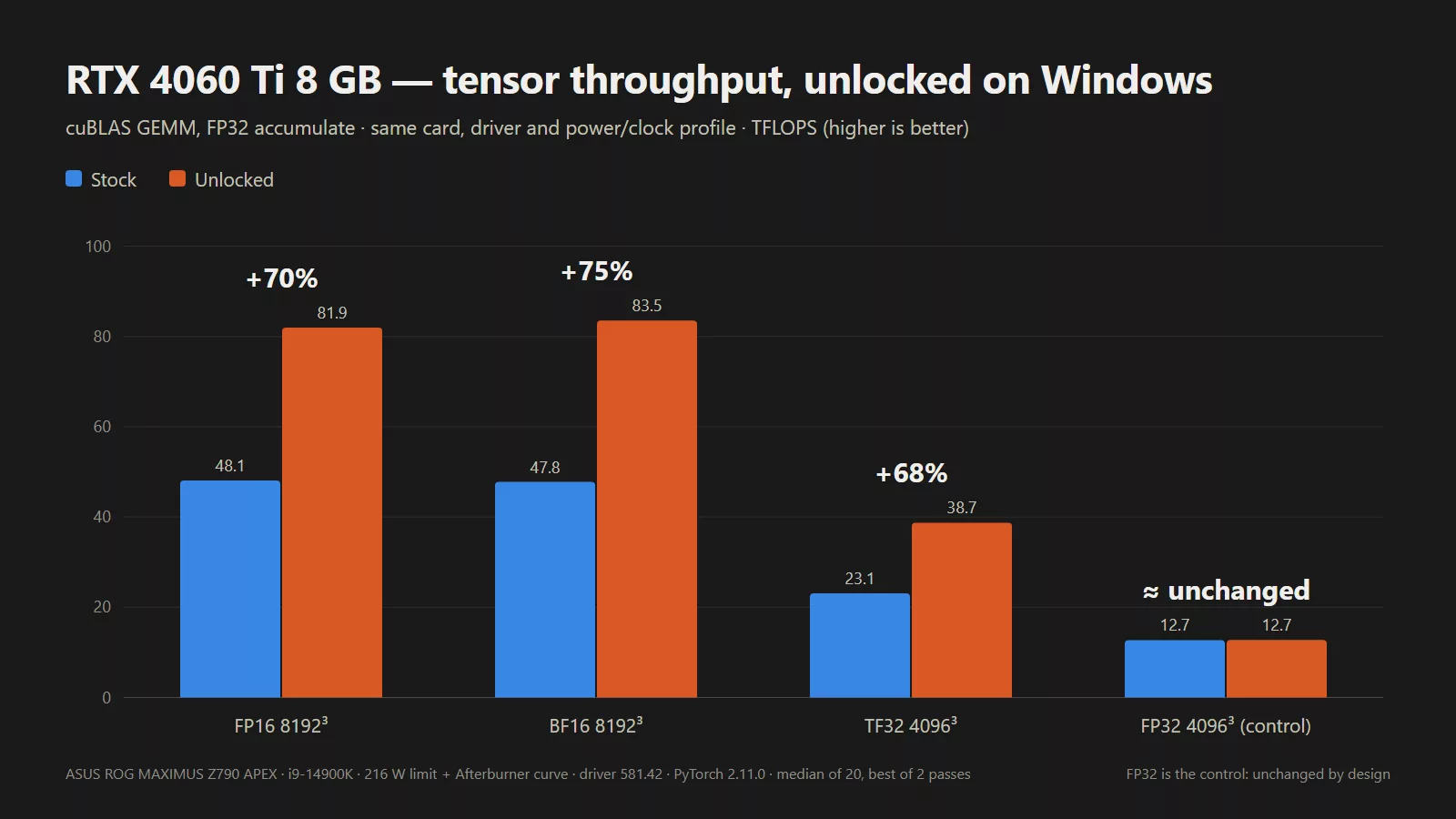
Reported performance increases vary depending on the hardware and specific test conditions, but the impact on AI-related tasks is significant:
Developers warn that combining this unlock with power-limit modifications can push the GPU beyond its factory thermal and electrical envelopes. Additionally, persistence on Thunderbolt eGPUs is not guaranteed, and the tool's effectiveness depends on the specific power and thermal headroom of the individual card.
Гика
