

HP Omnibook 5 14 Wildcat Review: A Premium Feel for a Budget Price
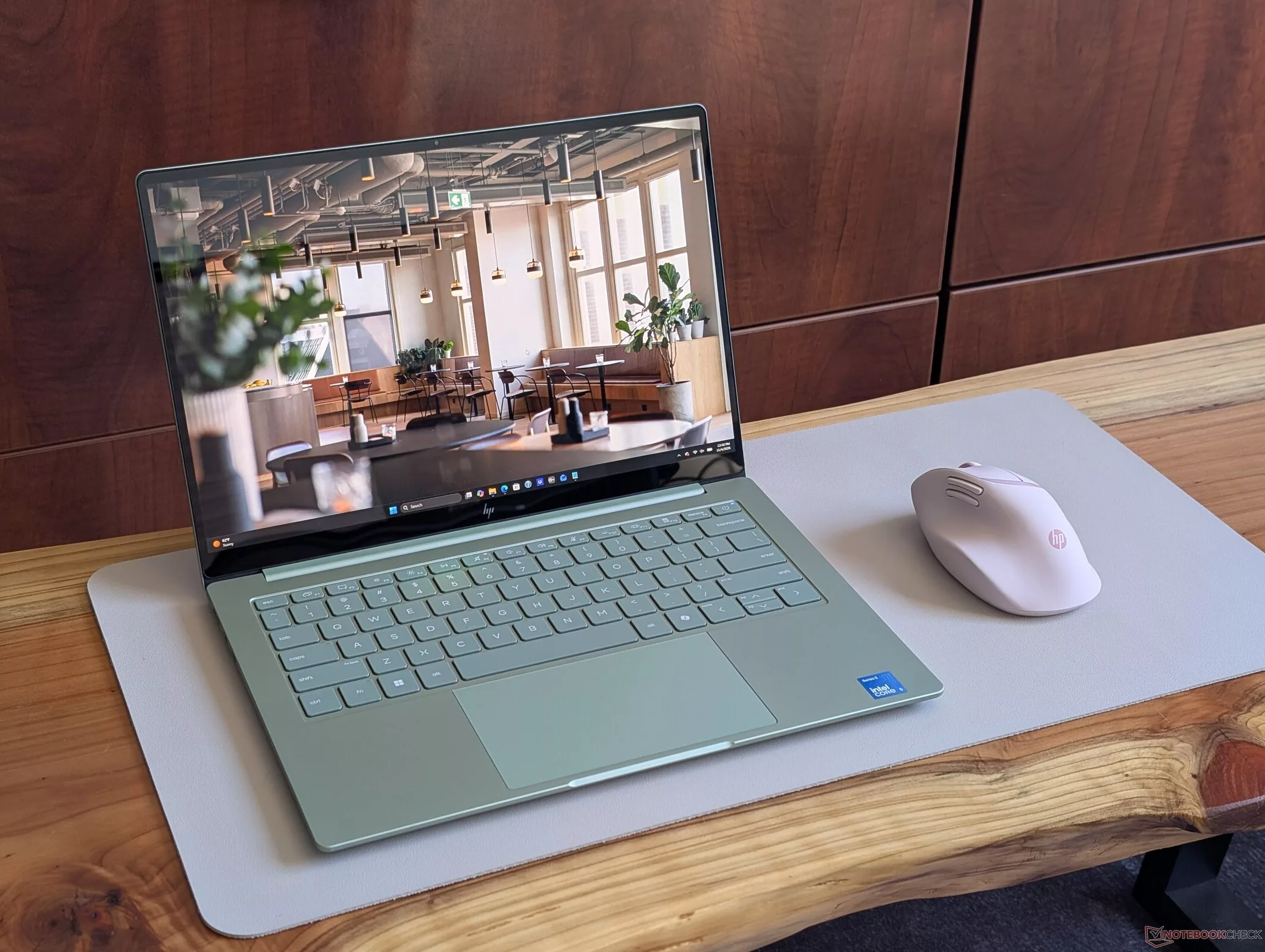
HP is making a serious play for the sub-$1000 ultrabook market with the Omnibook 5 14. While many budget laptops sacrifice aesthetics for cost, this Wildcat Lake-based machine aims to bridge the gap between the entry-level Pavilion series and the premium EliteBook line. With a starting price around $700, it offers a surprisingly high-quality chassis and standard OLED features that challenge much more expensive competitors like the Dell XPS 13.
The HP Omnibook 5 14 is a standout in the affordable Windows laptop segment. Much like the MacBook Neo or the Dell XPS 13 Wildcat, it seeks to raise the baseline for what consumers should expect from a non-premium device. At its entry price point, the device feels significantly more expensive than its price tag suggests, offering a sleek, unibody-like design made from recycled metal that mimics the premium feel of the EliteBook series.
Build and Design: Premium Aesthetics on a Budget
The chassis is constructed from recycled metal, covering the outer lid, keyboard frame, and base to create a consistent, single-tone appearance. It is available in four colors: Smoke Silver, Starlit Blue, Peony Pink, and Soft Honeydew. Weighing in at 1.178 kg, it is notably lighter than most 14-inch clamshells, making it an excellent companion for travel or students on the move.
Display and Connectivity: The OLED Trade-off
One of the most significant selling points is the standard inclusion of an OLED touchscreen with 100% DCI-P3 color coverage, even in the base $700 configuration. However, there is a catch: the base 1200p OLED panel is somewhat underwhelming. It is dimmer than average (around 280 cd/m²), lacks HDR support, and is limited to a 60 Hz refresh rate. In contrast, the Dell XPS 13 Wildcat offers a much brighter 120 Hz panel. Users can upgrade to a 1800p OLED configuration for an additional $120, which addresses the refresh rate and brightness issues, making it a much more viable option than simply upgrading the CPU.
Connectivity is functional but shows signs of cost-cutting. The device includes an integrated HDMI 2.1 port and two USB-C ports (10 Gbps) supporting DisplayPort 2.1 and Power Delivery 3.1. However, there is no USB-A port, no webcam shutter, and the port layout is somewhat asymmetrical, with no USB-C ports available on the right edge.
Performance: The Wildcat Limitation
The primary bottleneck for this system isn't the build quality, but the Intel Wildcat Lake architecture itself. Our test unit features the Intel Core 5 320 (6 cores/6 threads). While it handles general productivity tasks—such as web browsing, streaming, and schoolwork—with ease, it struggles with more demanding workloads. Local gaming or heavy graphics editing is largely out of reach, especially when compared to more powerful configurations utilizing Panther Lake or Lunar Lake architectures.
- Pros: Great build quality and sleek design for the price; OLED touchscreen with P3 colors standard; Lighter than most 14-inch clamshells; Integrated HDMI port; Long battery life.
- Cons: Display could be brighter with less glare; Performance is on the slower side; No webcam shutter or USB-A; 60 Hz limit with no HDR support; Weak bass reproduction.
Display: High Contrast and Color Accuracy
The HP Omnibook 5 14 Wildcat features a 14-inch Samsung SDC425A OLED panel with a resolution of 1920x1200 at 60 Hz. In our testing, the display demonstrated excellent color coverage, hitting 100% of both the sRGB and Display P3 color gamuts, while covering 93.1% of AdobeRGB 1998. This makes it a highly capable screen for content creators who rely on standard color spaces.
Brightness levels are adequate for indoor use, with a measured maximum of 283.8 cd/m² and an average of 281.7 cd/m². While this is significantly lower than some high-end competitors like the Dell XPS 13 DX13260 (which reached 503 cd/m²), the OLED technology ensures an infinite contrast ratio and deep blacks. The color accuracy is also noteworthy; after calibration, the Delta E (dE) values for ColorChecker and Greyscale were significantly improved, with the calibrated ColorChecker dE 2000 dropping to 0.92, indicating high precision.
Regarding eye comfort, the display uses Pulse-Width Modulation (PWM) to control brightness, with a measured frequency of 465.8 Hz and an amplitude of 12% at 100% brightness. While this high frequency is generally considered safe for most users, some individuals sensitive to PWM may still experience discomfort. The response times are exceptionally fast, with a Black-to-White response time of 1.6 ms, making it well-suited for fast-paced motion.
Performance: The Intel Core 5 320 in Action
Under the hood, this specific configuration is powered by the Intel Core 5 320. In Cinebench R23 multi-core testing, the processor achieved a score of 6319, which places it in a competitive mid-range bracket. However, when compared to higher-tier chips like the Intel Core Ultra 7 356H found in the OmniBook X 14-ka, there is a clear performance gap, as the latter significantly outperforms the Core 5 in multi-threaded workloads.
In single-core tasks, such as Cinebench 2024, the Core 5 320 delivered 112.5 points. In our AIDA64 FP32 Ray-Trace benchmark, the device scored 14.8 points, trailing behind the OmniBook X 14-ka (100 points) and the Dell 14S DS14260 (72.6 points), but performing notably better than the Dell XPS 13 DX13260 (15.2 points in a different context, though the raw AIDA64 score here shows the Core 5 320 is positioned as a mid-tier option). It is important to note that performance varies significantly depending on the specific CPU architecture and thermal headroom provided by the chassis.
System Performance and Architecture Gap
In terms of raw system performance, the HP Omnibook 5 14 (mh0004xx) sits at a noticeable disadvantage when compared to modern laptops equipped with Panther Lake (PTL) architecture. In PCMark 10 testing, the Omnibook 5 14 achieved a score of 6,509 points, trailing significantly behind the HP OmniBook X 14-ka, which utilizes the Ultra 7 356H and Intel Graphics 4 Xe3 PTL, scoring 90.5 points. This gap is consistent across the board, with other Panther Lake-based systems like the Dell 14S DS14260 (89.2 points) and Lenovo ThinkBook 14 G9 IPL (80.6 points) outperforming the Omnibook 5's Intel Core 5 320 and Xe3 Wildcat Lake (WCL) configuration.
Memory and Storage Throughput
The memory bandwidth reveals a massive disparity between the Wildcat Lake and Panther Lake platforms. The HP Omnibook 5 14 recorded a memory copy speed of 14,677 MB/s, which is only a marginal 5% improvement over the average for the Intel Core 5 320 / Xe3 WCL setup. In stark contrast, Panther Lake systems like the HP OmniBook X 14-ka reached 110,911 MB/s—a staggering 656% increase over the average. This bandwidth advantage directly impacts data-heavy tasks and modern integrated graphics performance.
Storage performance shows the Omnibook 5 14 lagging in several metrics. In AS SSD testing, it achieved a performance rating of 45.3 points, significantly lower than the Kioxia BG6-equipped HP OmniBook X 14-ka (86.4 points) or the Kioxia BG7 in the Dell XPS 13 (71 points). While the drive shows decent sequential read speeds of up to 3,016 MB/s (CDM 5/6), its 4K random read/write performance is notably lower than its higher-end competitors.
Graphics and Rendering Capabilities
The integrated Intel Graphics 2 Xe3 Wildcat Lake iGPU in the Omnibook 5 14 struggles in 3D applications. In 3DMark Time Spy, the device scored 1,578 points, which is roughly 40% lower than the Asus Vivobook S 14 OLED (Arc 130V) and significantly behind the Panther Lake-based Dell 14S DS14260. In Blender v3.3 Classroom, the Omnibook 5 14 took 912 seconds to complete a render, compared to 503 seconds for the Panther Lake-based Dell 14S DS14260, highlighting the generational performance leap.
Gaming Performance: The Generational Divide
Gaming benchmarks further emphasize the gap between the Wildcat Lake architecture and the newer Panther Lake/Arc 130V solutions. In a composite gaming metric, the Omnibook 5 14 scored 53.2 points, nearly half the score of the Asus Vivobook S 14 OLED (96.7 points) and the HP OmniBook X 14-ka (90.5 points). In specific titles like Cyberpunk 2077, the Omnibook 5 14 averaged 35.8 fps (1080p Low), while the Panther Lake-equipped Dell 14S DS14260 delivered 64.1 fps—an 80% increase in frame rates.
Even in less demanding titles like GTA V, the difference is palpable: the Omnibook 5 14 manages 35.8 fps, whereas the high-end Panther Lake systems reach much higher levels of fluidity, illustrating that while the Omnibook 5 14 is a capable machine for general tasks, it cannot compete with the upcoming architectural advancements seen in the Panther Lake lineup.
Gaming Performance: The Xe3 Wildcat Lake Experience
The HP Omnibook 5 14 (mh0004xx) features the Intel Core 5 320 paired with the Intel Graphics 2 Xe3 Wildcat Lake iGPU. In our testing, the performance varies significantly depending on the graphical presets used in Cyberpunk 2077. At 1080p Medium settings, the system delivered an average of 32.8 fps. However, as the demands increase, the frame rates drop noticeably: 24.3 fps at High presets and 17.4 fps at Ultra High settings. This puts the device in a position where it can handle lighter titles, but struggles with modern AAA games at high fidelity.
Looking at a broader range of titles, the Wildcat Lake iGPU shows its capabilities: it manages 97.2 fps in GTA V (2015) at Low settings and 81.5 fps in Dota 2 Reborn (2015) at Low. However, more demanding titles like Baldur's Gate 3 and Cyberpunk 2077 prove more challenging, with the latter averaging around 11–13 fps in various scenarios, indicating that the device is better suited for casual or older gaming experiences rather than intensive modern titles.
Thermals and Acoustic Profile
Thermal management on the Omnibook 5 14 is quite efficient for its class. Under heavy stress tests like Prime95, the CPU initially boosts to 3.2 GHz and consumes up to 27 W, reaching 92 °C after about 20 seconds. To maintain manageable temperatures, the system quickly throttles down to 2.5 GHz and 15 W, stabilizing the core temperature at 67 °C. In Cyberpunk 2077, the temperature settles around 70 °C.
The chassis remains relatively cool to the touch. The palmrest and touchpad areas stay below skin temperature, peaking at 25.6 °C. The bottom of the device reaches a maximum of 40.6 °C, which is slightly higher than the subnotebook average of 39.2 °C. Interestingly, the AC adapter remains relatively cool even during demanding workloads.
Acoustics and Audio Quality
In terms of noise, the fan profile is relatively quiet. At idle, the noise level is 24.4 dB(A), and under load (Cyberpunk 2077), it reaches 35.6 dB(A), which is only a 1% increase compared to the ambient environment. This makes the device quite stealthy during heavy tasks compared to many competitors in its class.
The built-in speakers offer a decent maximum volume of 83.5 dB(A), but the audio quality is limited by a lack of bass. On average, the bass reproduction is 20% lower than the median for similar devices. While the mids and highs are well-balanced and linear, the overall sound profile lacks the depth found in higher-end machines like the MacBook Pro 16 (M1 Pro).
Efficiency as a Core Strength
The HP Omnibook 5 14-mh0004xx, powered by the Intel Core 5 320 and Intel Graphics 2 Xe3 WCL architecture, distinguishes itself not through brute force, but through remarkable energy management. In a comparison of power consumption, this subnotebook consistently outperforms several more expensive competitors. For instance, its average load power consumption is significantly lower than the Dell 14S DS14260 (Ultra 7 355) and the HP OmniBook X 14-ka (Ultra 7 356H). While the Dell 14S draws an average of 48W under load, the Omnibook 5 14 keeps its consumption at a much more modest 24.7W in Cyberpunk 2077 (FHD ultra, no FSR).
This efficiency extends to idle states and heavy stress tests. During Prime95 and Furmark 1.25 stress tests, the Omnibook 5 14 averaged 27.8W, whereas the Dell 14S DS14260 reached 58.8W. Even when connected to an external monitor—a task that typically increases power draw—the Omnibook 5 14 remains highly efficient, averaging 25.8W in Prime95 compared to the 54.8W required by the Dell 14S. This makes it a much more stable and thermally manageable option for users who prioritize sustained, efficient operation over maximum wattage.
Battery Life and Real-World Endurance
When it comes to battery longevity, the Omnibook 5 14's 60 Wh capacity is utilized very effectively. In WiFi web surfing tests, the device achieved a runtime of 24 hours, outlasting the Dell XPS 13 DX13260 (52 Wh) and the Lenovo ThinkBook 14 G9 IPL (48 Wh). Even when compared to the Asus Vivobook S 14 OLED, which features a larger 75 Wh battery, the Omnibook 5 14 shows impressive endurance, particularly in high-efficiency scenarios.
However, it is important to note that performance and endurance come with trade-offs. While the device excels in efficiency, its gaming performance remains limited. In Cyberpunk 2077, the power draw is low, but this is a reflection of the hardware's lower performance ceiling rather than just optimization. The device is clearly optimized for productivity and mobile use rather than high-end gaming or heavy workstation tasks.
Summary of Power Metrics
Challenging the Premium Segment
The HP Omnibook 5 14 Wildcat enters a highly competitive landscape, positioning itself as a direct competitor to the Apple MacBook Pro 14 and the Dell XPS series. While many laptops in the thin-and-light category struggle to balance high-performance workloads with thermal efficiency, the Wildcat aims to bridge the gap between portable ultrabooks and mobile workstations. The core proposition is simple: providing professional-grade performance without the typical battery life compromises often associated with high-power hardware.
Performance and Thermal Management
One of the most significant claims regarding the Omnibook 5 14 Wildcat is its ability to maintain high performance levels during sustained workloads. In an era where many manufacturers prioritize thinness at the expense of thermal throttling, the Wildcat's architecture is designed to handle intensive tasks that would typically drain a battery or cause significant heat soak in standard Pavilion-tier devices. This makes it a serious contender for users who require more than just basic office productivity, moving the device into the realm of legitimate workstation alternatives.
However, performance in a thin chassis is always a delicate balance. While the hardware is capable of pushing boundaries, the real-world utility depends on how effectively HP manages the power limits (PL1 and PL2) and the cooling solution. The goal is to provide a machine that doesn't just boast high theoretical TFLOPS or clock speeds on paper, but can actually sustain those levels during long rendering or compilation sessions without the chassis becoming uncomfortable to touch.
The Competitive Landscape
- Direct competition with the MacBook Pro 14, particularly in terms of build quality and display technology.
- Aims to elevate the user experience far beyond the capabilities of the standard HP Pavilion lineup.
- Focuses on the 'prosumer' segment: users needing high-end specs in a highly portable form factor.
Ultimately, the Wildcat's success depends on whether it can deliver on the promise of being a 'MacBook Neo'—a device that offers a comparable level of integration and efficiency within the Windows ecosystem. For professionals moving away from macOS, this represents a significant shift in what is expected from a premium 14-inch Windows laptop.
Гика
